| Duration | 1.5 hours |
| Day | 1 of 2 |
Learning Objectives
By the end of this module, students will be able to:
- Explain what conversational AI is and its business applications
- Describe the SignalWire platform and its capabilities
- Identify the components of the AI Agents SDK
- Trace the path of a voice call through an AI agent
Topics
1. What is Conversational AI? (20 min)
Definition
Conversational AI enables natural language interactions between humans and computers through voice or text. Unlike traditional IVR systems with rigid menus, conversational AI understands intent and responds dynamically.
Key Capabilities
- Natural language understanding (NLU)
- Context awareness across conversation turns
- Dynamic response generation
- Intent recognition and fulfillment
- Multi-turn dialogue management
Business Applications
| Industry | Use Case | Benefit |
|---|---|---|
| Healthcare | Appointment scheduling | 24/7 availability |
| Finance | Account inquiries | Reduced wait times |
| Retail | Order status | Scalable support |
| Hospitality | Reservations | Consistent experience |
| Support | Ticket triage | Agent efficiency |
Discussion Questions
- What voice AI experiences have you had as a consumer?
- What made them good or frustrating?
- What opportunities exist in your organization?
2. SignalWire Platform Overview (25 min)
What is SignalWire?
SignalWire is a programmable unified communications (PUC) platform providing:
- Programmable voice calls
- SMS/MMS messaging
- Video conferencing
- AI-powered voice agents
Platform Components
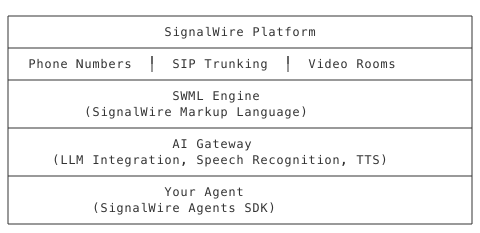
How It Works
- Inbound Call → Phone number receives call
- SWML Request → SignalWire requests instructions from your agent
- AI Conversation → Agent handles dialogue with caller
- Function Calls → Agent can perform actions (lookups, transfers)
- Call End → Summary and cleanup
Key Terminology
| Term | Definition |
|---|---|
| SWML | SignalWire Markup Language - JSON documents that control call behavior |
| SWAIG | SignalWire AI Gateway - enables AI function calling |
| Agent | Your application that generates SWML and handles functions |
| Webhook | HTTP endpoint SignalWire calls to get instructions |
3. SDK Architecture (25 min)
The SignalWire Agents SDK
A Python framework for building voice AI agents without low-level protocol handling.
What the SDK Provides
- AgentBase class - Foundation for all agents
- SWML generation - Automatic document creation
- SWAIG functions - Easy function definition
- Skills system - Reusable capabilities
- Deployment options - Multiple hosting environments
Architecture Diagram
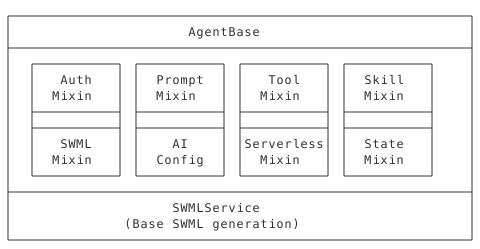
Mixins Explained
| Mixin | Purpose |
|---|---|
| Auth | HTTP authentication handling |
| Prompt | Prompt Object Model management |
| Tool | SWAIG function registration |
| Skill | Plugin system for capabilities |
| SWML | Document generation |
| AI Config | LLM and voice parameters |
| Serverless | Lambda/Cloud Functions support |
| State | Per-call data persistence |
CLI Tools
| Tool | Purpose |
|---|---|
swaig-test | Test agents locally without calls |
sw-search | Build knowledge base indexes |
sw-agent-init | Scaffold new projects |
4. Call Flow Deep Dive (20 min)
Complete Request Lifecycle
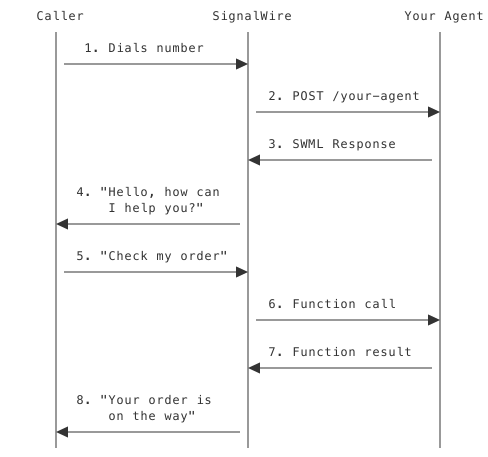
Five Phases of a Call
- Call Setup
- Number receives call
- SignalWire determines webhook URL
- Prepares request with call metadata
- SWML Generation
- Agent receives POST request
- Builds SWML document
- Returns AI configuration and functions
- AI Conversation
- SignalWire processes SWML
- LLM generates responses
- Speech synthesis speaks to caller
- Speech recognition captures input
- Function Execution
- AI determines function needed
- SignalWire calls agent’s SWAIG endpoint
- Agent executes logic, returns result
- AI incorporates result into conversation
- Call End
- Caller hangs up or transfer completes
- Optional post-prompt summary
- Call data available for analytics
Key Takeaways
- Voice AI is not IVR - It’s dynamic, contextual conversation
- SignalWire handles the hard parts - Telephony, speech, LLM integration
- SDK simplifies development - Focus on logic, not protocols
- Agents are webhook servers - They respond to SignalWire requests
- Functions extend capabilities - Beyond conversation to action
Preparation for Lab 1.1
- Ensure Python 3.10+ is installed
- Have VS Code ready
- SignalWire credentials available
- ngrok installed and authenticated
Resources
- AI Agents SDK Documentation: https://developer.signalwire.com/sdks/agents-sdk
- SDK GitHub: https://github.com/signalwire/signalwire-agents
- SWML Reference: See manual Chapter 2