| Duration | 2.5 hours |
| Day | 2 of 2 |
Learning Objectives
By the end of this module, students will be able to:
- Create SWAIG functions using the @tool decorator
- Define parameters with proper types
- Handle function execution flow
- Return appropriate responses
Topics
1. What Are SWAIG Functions? (20 min)
Definition
SWAIG (SignalWire AI Gateway) functions extend your agent’s capabilities beyond conversation. They allow the AI to:
- Look up information
- Perform actions
- Integrate with external systems
- Make decisions based on data
How It Works
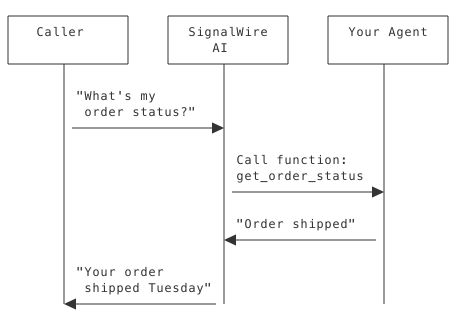
Function vs Conversation
| Conversation | Function |
|---|---|
| AI generates response | AI triggers your code |
| No external data needed | Can access databases/APIs |
| Immediate | May take time |
| Stateless | Can have side effects |
2. The @tool Decorator (30 min)
Basic Syntax
from signalwire_agents import AgentBase, SwaigFunctionResult

agent = AgentBase(name="my-agent")

@agent.tool(
    description="Look up the current weather",
    parameters={
        "type": "object",
        "properties": {
            "city": {"type": "string", "description": "City name"}
        },
        "required": ["city"]
    }
)
def get_weather(args: dict, raw_data: dict = None) -> SwaigFunctionResult:
    city = args.get("city", "")
    # Your logic here
    return SwaigFunctionResult(f"The weather in {city} is sunny and 72°F.")
Decorator Parameters
| Parameter | Type | Purpose |
|---|---|---|
description | str | Required. What the function does |
name | str | Override function name |
parameters | dict | Explicit JSON Schema |
secure | bool | Require authentication |
fillers | list | Phrases while executing |
Name Override
@agent.tool(
    name="check_weather",  # AI sees this name
    description="Get current weather for a city",
    parameters={
        "type": "object",
        "properties": {
            "city": {"type": "string", "description": "City name"}
        },
        "required": ["city"]
    }
)
def get_weather_info(args: dict, raw_data: dict = None) -> SwaigFunctionResult:
    city = args.get("city", "")
    # Function name in code can differ
    return SwaigFunctionResult(f"Weather in {city}: Sunny")
Security
@agent.tool(
    description="Update account password",
    secure=True,  # Requires function token
    parameters={
        "type": "object",
        "properties": {
            "new_password": {"type": "string", "description": "New password"}
        },
        "required": ["new_password"]
    }
)
def update_password(args: dict, raw_data: dict = None) -> SwaigFunctionResult:
    new_password = args.get("new_password", "")
    return SwaigFunctionResult("Password updated successfully.")
3. Parameters (35 min)
Type Hints (Automatic Schema)
The SDK generates JSON Schema from Python type hints:
@agent.tool(
    description="Search products",
    parameters={
        "type": "object",
        "properties": {
            "query": {"type": "string", "description": "Search query"},
            "category": {"type": "string", "description": "Product category"},
            "limit": {"type": "integer", "description": "Maximum results"}
        },
        "required": ["query"]
    }
)
def search_products(args: dict, raw_data: dict = None) -> SwaigFunctionResult:
    query = args.get("query", "")
    category = args.get("category")  # Optional
    limit = args.get("limit", 10)    # Optional with default
    return SwaigFunctionResult(f"Found products matching '{query}'")
Generated Schema:
{
  "type": "object",
  "properties": {
    "query": { "type": "string" },
    "category": { "type": "string" },
    "limit": { "type": "integer" }
  },
  "required": ["query"]
}
Type Mapping
| Python Type | JSON Schema Type |
|---|---|
str | "string" |
int | "integer" |
float | "number" |
bool | "boolean" |
list | "array" |
dict | "object" |
Explicit Parameters
For more control, define the schema explicitly:
@agent.tool(
    description="Record a rating",
    parameters={
        "type": "object",
        "properties": {
            "rating": {
                "type": "integer",
                "description": "Rating from 1 to 5",
                "minimum": 1,
                "maximum": 5
            },
            "feedback": {
                "type": "string",
                "description": "Optional feedback text"
            }
        },
        "required": ["rating"]
    }
)
def record_rating(args: dict, raw_data: dict = None) -> SwaigFunctionResult:
    rating = args.get("rating", 0)
    feedback = args.get("feedback", "")
    return SwaigFunctionResult(f"Thanks for the {rating}-star rating!")
Enum Parameters
Limit to specific values:
@agent.tool(
    description="Transfer to department",
    parameters={
        "type": "object",
        "properties": {
            "department": {
                "type": "string",
                "enum": ["sales", "support", "billing"],
                "description": "Target department"
            }
        },
        "required": ["department"]
    }
)
def transfer_to_department(args: dict, raw_data: dict = None) -> SwaigFunctionResult:
    department = args.get("department", "")
    return SwaigFunctionResult(f"Transferring to {department}...")
4. Function Execution (25 min)
Return Values
Always return a SwaigFunctionResult:
from signalwire_agents import SwaigFunctionResult

@agent.tool(
    description="Get account balance",
    parameters={
        "type": "object",
        "properties": {
            "account_id": {"type": "string", "description": "Account ID"}
        },
        "required": ["account_id"]
    }
)
def get_balance(args: dict, raw_data: dict = None) -> SwaigFunctionResult:
    account_id = args.get("account_id", "")
    # Fetch from database
    balance = 1234.56

    # Return result - AI will speak this
    return SwaigFunctionResult(f"Your account balance is ${balance}")
What Gets Spoken
The string in SwaigFunctionResult becomes part of the AI’s response:
return SwaigFunctionResult("Your order shipped on Tuesday.")
# AI might say: "I found your order. Your order shipped on Tuesday. Is there anything else?"
Raw Data Response
Return structured data for AI to interpret:
@agent.tool(
    description="Get order details",
    parameters={
        "type": "object",
        "properties": {
            "order_id": {"type": "string", "description": "Order ID"}
        },
        "required": ["order_id"]
    }
)
def get_order(args: dict, raw_data: dict = None) -> SwaigFunctionResult:
    order_id = args.get("order_id", "")
    order = {
        "id": order_id,
        "status": "shipped",
        "date": "2024-01-15",
        "items": ["Widget A", "Widget B"]
    }
    return SwaigFunctionResult(str(order))
The AI will format this naturally in speech.
5. Fillers and Wait States (20 min)
Function Fillers
For functions that take time:
@agent.tool(
    description="Search the database",
    parameters={
        "type": "object",
        "properties": {
            "query": {"type": "string", "description": "Search query"}
        },
        "required": ["query"]
    },
    fillers=[
        "Searching now...",
        "Looking that up...",
        "One moment while I search..."
    ]
)
def search_database(args: dict, raw_data: dict = None) -> SwaigFunctionResult:
    query = args.get("query", "")
    # Slow operation
    import time
    time.sleep(2)
    return SwaigFunctionResult(f"Found 5 results for '{query}'")
Wait Files
Play audio while processing:
@agent.tool(
    description="Process payment",
    parameters={
        "type": "object",
        "properties": {
            "amount": {"type": "number", "description": "Payment amount"}
        },
        "required": ["amount"]
    },
    wait_file="https://example.com/processing.mp3",
    wait_file_loops=3
)
def process_payment(args: dict, raw_data: dict = None) -> SwaigFunctionResult:
    amount = args.get("amount", 0.0)
    # Payment processing
    return SwaigFunctionResult("Payment processed successfully.")
6. Testing Functions (20 min)
List Functions
swaig-test agent.py --list-tools
Output:
Available tools:
  get_weather - Look up the current weather
    Parameters:
      city (string, required)

  search_products - Search products
    Parameters:
      query (string, required)
      category (string)
      limit (integer)
Execute Functions
# Execute with arguments
swaig-test agent.py --exec get_weather --city "Seattle"
Output:
Executing function: get_weather
Arguments: {"city": "Seattle"}
Result: The weather in Seattle is sunny and 72°F.
Multiple Arguments
swaig-test agent.py --exec search_products --query "laptop" --limit 5
Complete Example
Click to reveal complete solution
#!/usr/bin/env python3
"""Agent with SWAIG functions."""

from signalwire_agents import AgentBase, SwaigFunctionResult

agent = AgentBase(name="order-agent", route="/orders")

agent.prompt_add_section(
    "Role",
    "You help customers check their order status. "
    "Ask for their order number to look it up."
)

agent.add_language("English", "en-US", "rime.spore")

# Simple function
@agent.tool(
    description="Look up order status by order number",
    parameters={
        "type": "object",
        "properties": {
            "order_number": {"type": "string", "description": "Order number"}
        },
        "required": ["order_number"]
    }
)
def get_order_status(args: dict, raw_data: dict = None) -> SwaigFunctionResult:
    order_number = args.get("order_number", "")
    # In reality, query database
    return SwaigFunctionResult(
        f"Order {order_number} shipped yesterday via FedEx. "
        f"Expected delivery is Thursday."
    )

# Function with multiple parameters
@agent.tool(
    description="Search for orders by customer email",
    parameters={
        "type": "object",
        "properties": {
            "email": {"type": "string", "description": "Customer email"},
            "status": {"type": "string", "description": "Order status filter"}
        },
        "required": ["email"]
    },
    fillers=["Searching your orders...", "Looking that up now..."]
)
def search_orders(args: dict, raw_data: dict = None) -> SwaigFunctionResult:
    email = args.get("email", "")
    status = args.get("status")  # Optional
    # In reality, query database
    return SwaigFunctionResult(
        f"Found 3 orders for {email}. "
        "The most recent is order 12345, shipped Monday."
    )

if __name__ == "__main__":
    agent.run()
Common Mistakes
1. Missing Return Type
Wrong:
@agent.tool(description="Get info")
def get_info(id: str):  # No return type hint
    return "Info here"  # Returns string, not SwaigFunctionResult
Right:
@agent.tool(
    description="Get info",
    parameters={
        "type": "object",
        "properties": {
            "id": {"type": "string", "description": "ID to lookup"}
        },
        "required": ["id"]
    }
)
def get_info(args: dict, raw_data: dict = None) -> SwaigFunctionResult:
    id = args.get("id", "")
    return SwaigFunctionResult("Info here")
2. Missing Description
Wrong:
@agent.tool()  # No description!
def get_data(args: dict, raw_data: dict = None) -> SwaigFunctionResult:
    id = args.get("id", "")
    return SwaigFunctionResult("Data")
Right:
@agent.tool(
    description="Retrieve data by ID",
    parameters={
        "type": "object",
        "properties": {
            "id": {"type": "string", "description": "ID to retrieve"}
        },
        "required": ["id"]
    }
)
def get_data(args: dict, raw_data: dict = None) -> SwaigFunctionResult:
    id = args.get("id", "")
    return SwaigFunctionResult("Data")
3. Poor Description
Wrong:
@agent.tool(description="Does stuff") # Too vague
Right:
@agent.tool(description="Look up customer account balance by account number")
The AI uses the description to decide when to call the function!
Key Takeaways
- @tool decorator - Easy function registration
- Type hints - Automatic parameter schema generation
- SwaigFunctionResult - Required return type
- Description matters - AI uses it to decide when to call
- Fillers help UX - Fill processing time naturally
- Test with swaig-test - Verify before live calls
Preparation for Lab 1.7
- Working agent with prompts and voice
- Understanding of function purpose
- Test data ready (fake order numbers, etc.)
Lab Preview
In Lab 1.7, you will:
- Add a lookup function to your agent
- Define parameters with proper types
- Test function execution with swaig-test
- Make a live call and use the function