| Duration | 2.5 hours |
| Day | 1 of 2 |
Learning Objectives
By the end of this module, students will be able to:
- Set up ngrok for local development
- Configure static domains for consistent URLs
- Implement basic authentication
- Connect a SignalWire phone number to their agent
- Make their first live call
Topics
1. The Exposure Problem (15 min)
Why Tunneling?
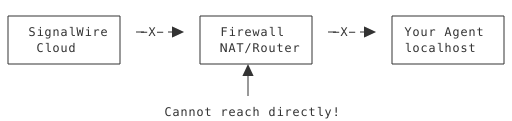
Your agent runs on localhost:3000, but SignalWire needs to reach it from the internet.
Solutions
| Solution | Use Case | Complexity |
|---|---|---|
| ngrok | Development | Low |
| Cloudflare Tunnel | Development/Production | Medium |
| Cloud deployment | Production | High |
| Port forwarding | Not recommended | High risk |
2. ngrok Setup (30 min)
Installation Verification
ngrok version
# ngrok version 3.x.x
Basic Tunnel
# Start your agent first
python agent.py

# In another terminal
ngrok http 3000
ngrok Output
Session Status                online
Account                       your@email.com (Plan: Free)
Version                       3.x.x
Region                        United States (us)
Latency                       45ms
Web Interface                 http://127.0.0.1:4040
Forwarding                    https://a1b2c3d4.ngrok.io -> http://localhost:3000

Connections                   ttl     opn     rt1     rt5     p50     p90
                              0       0       0.00    0.00    0.00    0.00
Key Information
| Field | Meaning |
|---|---|
| Forwarding URL | Public URL for your agent |
| Web Interface | Local dashboard for inspection |
| Latency | Round-trip time to ngrok |
Testing the Tunnel
# From another terminal or browser
curl https://a1b2c3d4.ngrok.io
3. Static Domains (20 min)
The Problem with Random URLs
Each ngrok restart creates a new URL:
https://a1b2c3d4.ngrok.io(Monday)https://e5f6g7h8.ngrok.io(Tuesday)
You must update SignalWire each time!
Static Domain Solution
ngrok free accounts get one static domain:
# Set up static domain (one-time)
ngrok http --url=https://your-name.ngrok-free.app 3000
Now the URL never changes!
4. Basic Authentication (25 min)
Why Authentication?
Without auth, anyone who discovers your URL can:
- Trigger your agent
- Rack up API costs
- Access function endpoints
How the SDK Handles Authentication
The SDK automatically secures your agent with HTTP Basic Authentication. When you start your agent, you’ll see the credentials printed:
Agent 'my-agent' is available at:
URL: http://localhost:3000
Basic Auth: signalwire:7vVZ8iMTOWL0Y7-BG6xaN3qhjmcm4Sf59nORNdlF9bs (source: generated)
Important: The password is randomly generated and changes every restart unless you set environment variables.
Setting Persistent Credentials
To keep the same credentials across restarts, set these environment variables. You have two options:
Option 1: Export directly (temporary, current terminal only)
export SWML_BASIC_AUTH_USER=signalwire
export SWML_BASIC_AUTH_PASSWORD=your-secure-password-here
python agent.py
Option 2: Use a .env file with python-dotenv (recommended)
First, install python-dotenv:
pip install python-dotenv
Create a .env file:
# .env
SWML_BASIC_AUTH_USER=signalwire
SWML_BASIC_AUTH_PASSWORD=your-secure-password-here
Then load it in your agent:
from dotenv import load_dotenv
load_dotenv()  # Load .env before creating agent

from signalwire_agents import AgentBase
agent = AgentBase(name="my-agent")
# ... rest of agent
Now when you start your agent, you’ll see:
Agent 'my-agent' is available at:
URL: http://localhost:3000
Basic Auth: signalwire:your-secure-password-here (source: environment)
Notice the source changed from generated to environment.
URL Format with Auth
https://username:password@your-name.ngrok-free.app/agent
Testing Auth
# Without auth - should fail
curl https://your-name.ngrok-free.app/agent
# 401 Unauthorized

# With auth - should work (use credentials from agent startup output)
curl https://signalwire:your-secure-password-here@your-name.ngrok-free.app/agent
# Returns SWML
5. SignalWire Configuration (30 min)
Step 1: Create a SWML Script Resource
- Log in to SignalWire dashboard
- Navigate to My Resources in the left sidebar
- Click Script
- Click New SWML Script
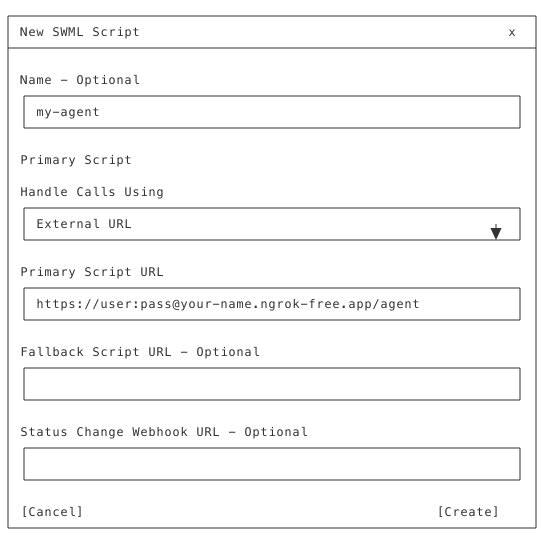
- Fill in the fields:
- Name: Give your script a name (e.g., “my-agent”)
- Handle Calls Using: Select External URL
- Primary Script URL: Enter your ngrok URL with credentials
- Format:
https://user:pass@your-name.ngrok-free.app/agent
- Format:
- Click Create
Step 2: Add a Phone Number or Address
After creating the script, you’ll see the resource configuration page:
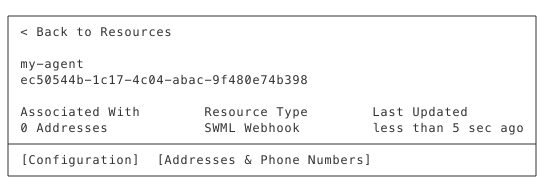
- Click the Addresses & Phone Numbers tab
- Click + Add
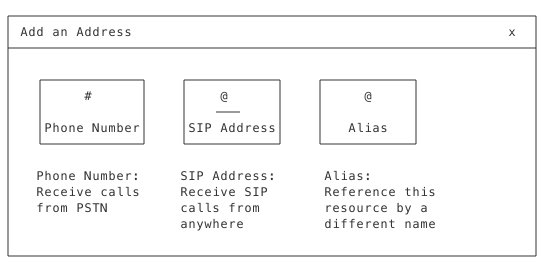
- Choose your address type:
- Phone Number: For receiving calls from regular phones (PSTN)
- SIP Address: For receiving SIP calls
- Alias: For referencing this resource by a custom name
- Follow the prompts to select or purchase a phone number
- Your number is now connected to your agent!
Step 3: Test Your Setup
- Ensure your agent is running locally
- Ensure ngrok is running and connected
- Call your SignalWire phone number
- Hear your agent respond!
6. Troubleshooting Connections (20 min)
Common Issues
ngrok Not Running
Symptom: SignalWire shows connection errors Fix: Ensure ngrok is running in a terminal
Wrong Port
Symptom: ngrok shows 502 Bad Gateway Fix: Match ngrok port to agent port
# Agent runs on 5000
python agent.py  # PORT=5000

# ngrok must match
ngrok http 5000
Auth Mismatch
Symptom: 401 Unauthorized Fix: Ensure credentials match between agent and SignalWire URL
Agent Crashed
Symptom: 502/503 errors Fix: Check agent terminal for errors, restart
Debugging with ngrok Inspector
Open http://127.0.0.1:4040 to see:
- All requests to your tunnel
- Request/response bodies
- Timing information
Test Checklist
# 1. Agent running?
curl http://localhost:3000/agent

# 2. ngrok tunnel working?
curl https://your-name.ngrok-free.app/agent

# 3. Auth working?
curl https://user:pass@your-name.ngrok-free.app/agent

# 4. SWML valid?
swaig-test agent.py --dump-swml
Complete Setup Example
agent.py
#!/usr/bin/env python3
from dotenv import load_dotenv
load_dotenv()  # Load .env file

from signalwire_agents import AgentBase

agent = AgentBase(
    name="my-first-agent",
    route="/agent"
)

# Configuration
agent.prompt_add_section(
    "Role",
    "You are a friendly assistant. Greet callers warmly and "
    "ask how you can help them today."
)

agent.add_language("English", "en-US", "rime.spore")

if __name__ == "__main__":
    agent.run()
.env
# Authentication credentials (SDK reads these automatically)
SWML_BASIC_AUTH_USER=signalwire
SWML_BASIC_AUTH_PASSWORD=my-secure-password-123
Start Commands
# Terminal 1: Start agent
source .venv/bin/activate
pip install python-dotenv  # If not already installed
python agent.py

# You'll see output like:
# Agent 'my-first-agent' is available at:
# URL: http://localhost:3000
# Basic Auth: signalwire:my-secure-password-123 (source: environment)

# Terminal 2: Start tunnel
ngrok http --url=https://my-agent.ngrok-free.app 3000
SignalWire URL
Use the credentials shown in your agent’s startup output:
https://signalwire:my-secure-password-123@my-agent.ngrok-free.app/agent
Key Takeaways
- ngrok bridges local to internet - Essential for development
- Static domains save time - Same URL across restarts
- Always use authentication - Protect your endpoints
- Test the chain - Agent → ngrok → SignalWire
- Use ngrok inspector - Debug connection issues
Preparation for Lab 1.4
- Agent working locally (from Lab 1.2)
- ngrok installed and authenticated
- SignalWire account with phone number
- Phone to make test call
Lab Preview
In Lab 1.4, you will:
- Set up ngrok with static domain
- Add authentication to your agent
- Configure SignalWire phone number
- Make your first live call!